

Documentation Index
Fetch the complete documentation index at: https://arize-ax.mintlify.dev/docs/llms.txt
Use this file to discover all available pages before exploring further.
Automatically revoke API key access with expiration dates
May 27, 2026 New SDKs and REST APIs User API keys and service keys now support an optional expiration date set at creation time. The expiration date appears in the API key tables in the UI, and expired keys are rejected at authentication. Access stops automatically when the key is no longer valid. Short-lived keys are now easier to rotate and align with security policies for contractors, CI jobs, and integrations you plan to retire. Once a key expires, it simply stops working; you no longer need to remember to delete it manually. Visit the API and Service Keys documentation to learn more.Rearrange trace columns to fit your workflows
May 27, 2026 New Tracing and Sessions Traces and spans tables now support column reordering. You can now drag column headers or use the column menu (move left, move right, hide, or sort) to arrange columns in any order. Your column layout is saved in the browser and persists across sessions. Existing sorting, filtering, resizing, and row selection are unaffected. This feature allows you to arrange the traces and spans tables to match how you actually debug, without reconfiguring it each time you open a project. Visit the view and manage traces documentation to learn more.Reliable prompt retrieval and CLI output with Python SDK updates
May 27, 2026 Fix SDKs and REST APIs Three patch releases following 8.28.0 address reliability issues in prompt retrieval, CLI output, and OpenAPI schema generation:| Version | Highlights |
|---|---|
| 8.28.1 | Fix for prompts.get() when prompt versions use full invocation parameters |
| 8.28.2 | Clearer CLI output for prompts; fix ax users list crash; explicit error when multiple spaces share the same name |
| 8.28.3 | OpenAPI schema cleanup (named response schemas) for generated client consistency |
prompts.get() to retrieve a prompt version by label, including versions that have invocation parameters set:
Visit the Prompts documentation to learn more.
Evaluate dataset examples with LLM and code evaluators
May 20, 2026 New Datasets and Experiments You can now run LLM-as-a-Judge and code evaluators directly on a dataset’s examples. Each run evaluates rows as they currently exist in the dataset and writes results back, joining them to their respective rows. This is useful when iterating on an evaluator against a fixed set of examples, maintaining a golden or reference dataset with up-to-date scores, or running regression checks on curated rows. Visit the evaluations on datasets documentation to learn more.See operational and evaluation metrics in one place with the new Evals & Metrics tab
May 20, 2026 New Tracing and Sessions LLM project tracing now includes an Evals & Metrics tab that combines operational charts (traffic, latency, tokens, and cost) with evaluation metrics and counts. The four operational charts can be pinned to the tracing overview or kept on the tab, with your layout saved per project. Every tracing project gets this layout automatically, no need to build a custom view to see operational and evaluation data together. Keep a lean overview for day-to-day monitoring and open a single tab for trends and eval scores, without splitting system health and evaluation performance across unrelated views. Visit the tracing documentation to learn more.Generate custom trace views with Alyx
May 20, 2026 New Alyx Alyx can now generate custom trace views from a short natural-language description. Alyx produces a sandboxed React visualization that renders against the trace and span data you already have open; inputs, outputs, metadata, evaluations, and span relationships. You can accept the view, refine it in chat, then save it, rename it, pin it as a tab, and share it with your team. This feature allows you to tailor layouts for your unique debugging needs, whether you need agent turns, tool calls, eval scores side by side, or a compact summary for incidents. You can easily create layouts with Alyx instead of exporting data or building one-off UIs, and saved views become reusable lenses on traces for you and your team. Visit the Alyx documentation to learn more.Access platform and observability APIs with the new Go SDK v2
May 20, 2026 New SDKs and REST APIs The Go SDK v2 is now available — the Go client for the Arize REST API. It covers platform and observability APIs including organizations, projects, API keys, spans, annotations, role bindings, and more. You can reference resources by name and ID, create service-scoped API keys, manage organization membership, annotate spans, and use a consistent API surface across subclients, with runnable examples in the repo. The code example below shows how to initialize the Go SDK v2 client:Annotate spans, manage users, and update datasets with Python SDK updates
May 20, 2026 New SDKs and REST APIs Three releases extend the v8ArizeClient for eval workflows, span annotations, user and API key admin, and dataset management:
| Version | Highlights |
|---|---|
| 8.26 | Annotate spans from code; run evaluation tasks against selected dataset examples via trigger_run; clearer types for annotation configs |
| 8.27 | Find users by email, bulk delete users, and create service-scoped API keys |
| 8.28 | Rename datasets via the API; improved generated types for evaluators, tasks, annotation queues, and API keys |
Automatically Add Spans to Labeling Queues
May 13, 2026 New Annotations You can now configure a labeling queue to automatically pull in spans matching optional filter criteria, so you can build review pipelines without manual curation.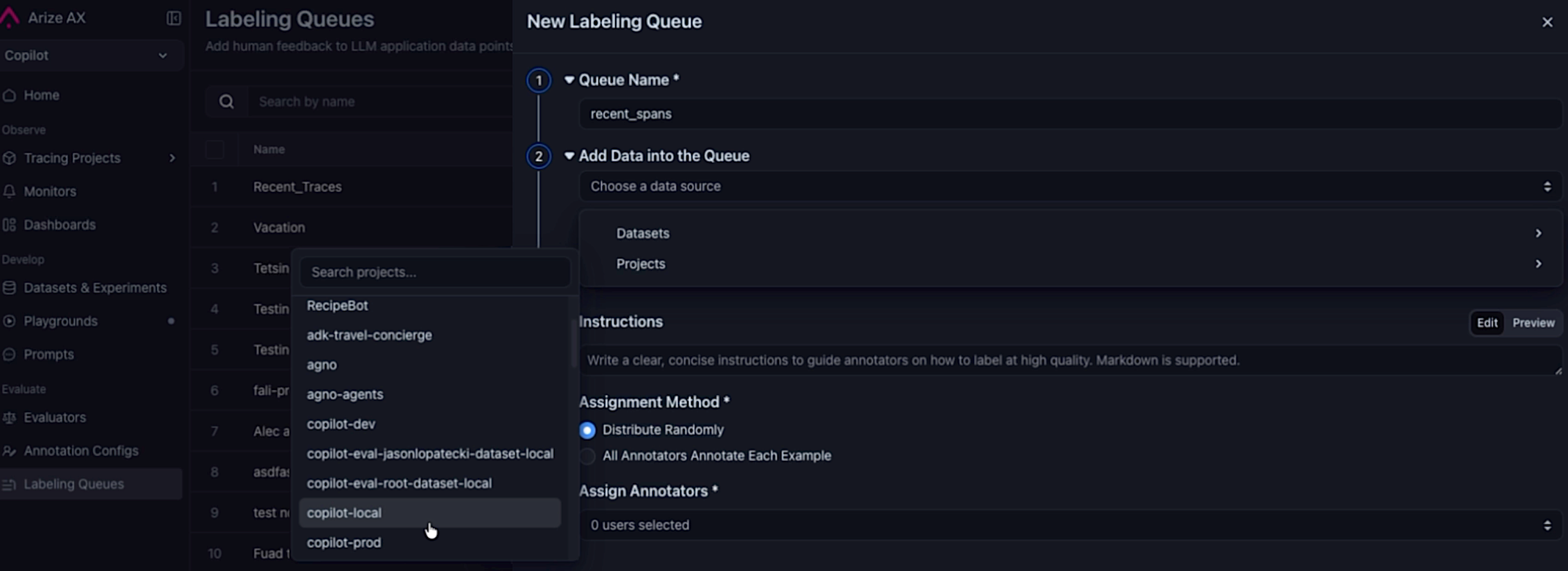 Selecting a project as the datasource when creating a queue to automatically pull in spans.
- Project datasource — Select a project as the data source when creating a queue.
- Query filter — Optionally scope which spans are routed for labeling (for example,
attributes.openinference.span.kind = 'LLM'). - Sampling rate — Route a representative slice of traffic when matching span volume exceeds annotation bandwidth.
- Continuous and backfill modes — Enable continuous ingestion to keep pace with new traffic, backfill to seed the queue from existing spans, or both.
- Queue cap — Set an optional cap to prevent unbounded growth and keep the queue manageable.
Easily Run Evaluators on Selected Experiments
May 13, 2026 Improvement Datasets and Experiments Pick experiments in the Experiments table, click Run Evaluator, and the evaluator creation dialog opens with those experiments already pre-populated. No need to re-select them by hand.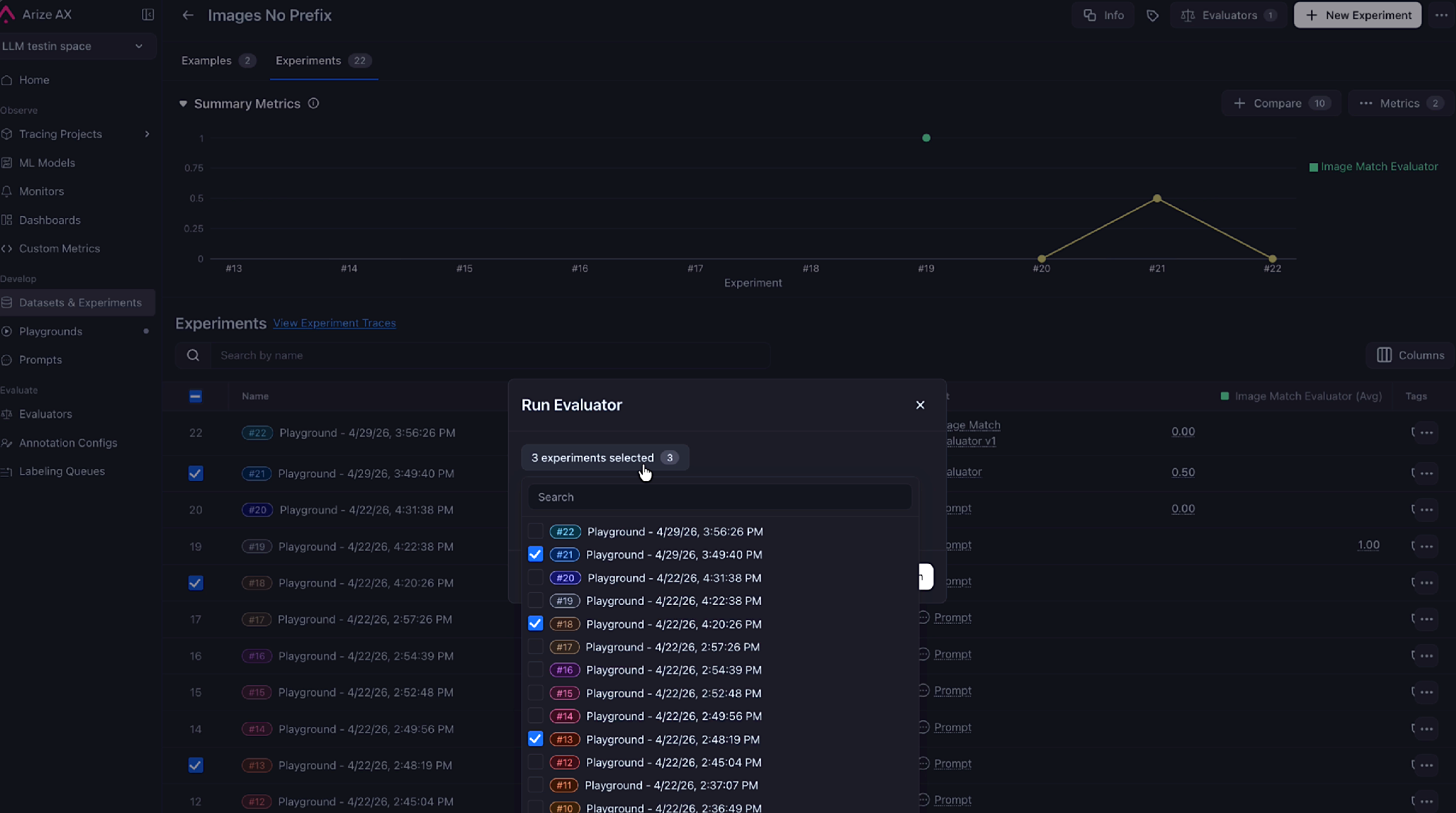 Selected experiments are now pre-populated in the evaluator dialog.
For more information, refer to the run offline evals on experiments documentation.
Selected experiments are now pre-populated in the evaluator dialog.
For more information, refer to the run offline evals on experiments documentation.
Manage Users, Roles, and Invitations from the Python SDK
May 12, 2026 New SDKs and REST APIsarize-python-sdk v8.24.0 adds full CRUD support for the /v2/users endpoints so you can manage your account’s user base programmatically instead of clicking through the UI.
- Lifecycle operations —
users.list(),get(),create(),update(), anddelete()cover the standard CRUD flow. - Invitation and password flows —
users.resend_invitation()andusers.reset_password()automate the most common admin chores. - Typed domain models — User, organization, and space roles now return as Pydantic models with discriminated unions, so
ax users listand other CLI surfaces produce cleanto_dfoutput instead of crashing on raw API types.
Fixes and Improvements
May 7–13, 2026 Custom Metrics- Improvement
PROJECTis now accepted as an alias forMODELin custom metric SQL, so you can writeFROM projectto match how tracing projects are named elsewhere in the platform. ExistingFROM modelqueries are unaffected.
- Improvement The Alyx home agent can now list traces directly, so you can ask for recent traces without having to switch surfaces first.
- Fix Editing a Prompt Playground prompt through Alyx no longer fails when the model returns the prompt as a JSON-encoded string—Alyx parses it automatically and retries less often.
- Fix The Alyx
read_prompttool validates prompt IDs before calling, eliminating a class of failed reads. - Fix Re-opening an Alyx chat with a
custom_trace_viewwidget no longer renders a fresh Accept button, so users can’t accidentally create duplicate views.
- Improvement A new background job soft-deletes annotation queue records that have been annotated or sat untouched for a year, keeping queue tables from growing unbounded as the auto-add-to-queue feature ramps up.
- Fix Creating an annotation queue via
POST /v2/annotation-queuesno longer throws 500 errors for accounts whose user names aren’t"admin"—the underlying SQL now references the correct column.
- Fix Toggling Enable Tracing on an existing template-eval online task now persists on save. Previously the field was silently dropped when patching legacy (pre–Eval Hub) tasks, so tracing reverted on reload.
- Improvement The integration setup flow now shows tooltips on each field, so it’s easier to understand what each value should be before submitting.
- Fix
POST /v2/experimentsnow returns400 Bad Requestfor schema mismatches such as aneval.*.scoretype mismatch, instead of a generic500.
- Fix Switching to pretty JSON formatting in the trace view no longer causes UI issues on large payloads.
Visualize Evaluator Score Distributions Across Spans and Experiments
May 6, 2026 New Dashboards and Visualizations Eval score charts are now available to all users. Visualize how your evaluator scores distribute across spans and experiments directly from the model overview and tracing pages—no configuration required.Review and Confirm Alyx Proposals Before They Take Effect
May 6, 2026 Improvement Alyx Three Alyx operations that previously applied changes silently now go through a visible confirmation drawer before taking effect. You can review, edit, and accept or skip each proposal before it is saved.- Eval Form Proposals: When Alyx suggests creating or updating an evaluator, it now shows an editable drawer with the proposed name, display name, template, and classification choices. Edit any field before accepting.
- Task Creation: Alyx surfaces a review drawer when proposing a new evaluation task, showing the task name, evaluator, target project or dataset, run mode, and sampling rate before the task is created.
- Task Configuration: Configuring task parameters through Alyx now always routes through a confirmation drawer, whether you’re on the task-builder page or elsewhere in the platform.
Control Annotation Queue Capacity with Per-Queue Record Limits
May 6, 2026 Improvement Annotations You can now set and clear a custommax_records cap on individual annotation queues from the queue settings UI. A per-queue limit overrides the global account default, so high-volume queues and targeted review queues can each hold the right number of records without a one-size-fits-all ceiling.
Assign Multiple Annotation Queue Records to a Reviewer in Bulk
May 6, 2026 New Annotations Assign multiple annotation queue records to a reviewer in a single operation. Select the records you want to route, choose a reviewer, and submit—no need to assign them one at a time.Wire Experiment Runs into Automated Pipelines with the run_experiment REST API
May 6, 2026 New SDKs and REST APIs The v2 REST API now supports experiment run tasks. You can create, update, and triggerrun_experiment tasks programmatically with the same endpoints used for other task types, making it straightforward to wire experiment runs into automated pipelines.
Fixes and Improvements
May 1–6, 2026- Fix Models and Integrations Azure OpenAI o-family models (o1, o3-mini, o4-mini) now work correctly in Prompt Playground and evals—the default API version is updated to
2025-04-01-previewso you no longer need to enter it manually. - Fix Datasets and Experiments The “View Experiment Traces” button now returns correct results for experiments run via the Arize Python SDK, which uses
experiment_idrather thandataset_id. - Fix Evaluators Eval result columns in
eval.<name>.<field>format generated by AX experiment evals are no longer dropped before the output is returned. - Fix Evaluators “View Task Logs” from an eval feedback tooltip now opens the exact task run instead of an approximate lookup that failed for renamed evaluators and older runs.